| |
Call user defined C function
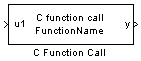
Description
The C Function Call block allows to include your custom C written functions (that could contain assembly language) into the schematic. It Interfaces your functions with the MathWorks Simulink diagram. The .c file containing the code of the function should be placed in the same directory as the .mdl file. If the c file is in another directory, it must be manually added in the "Simulation Parameters -> Real time workshop -> additional C file"
Dialog Box
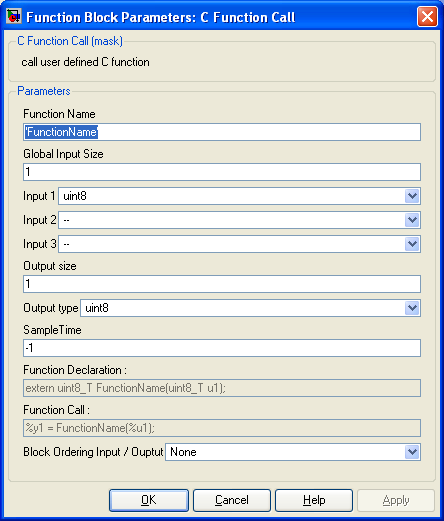
-
Enter your C function name between single quotes 'zzz'. Do not provide the prototype.
-
Global input size
-
Specify if the variables of the inputs are scalar (1) or vector ( >1 : array with one dimension). All different input data have the same size. they must all be either scalars nor vectors of equal dimension.
-
Input 1 2 3
-
Set the input type for the first three input. Set unused input as -- (all to -- if no input)
-
Output Size
-
Size of the output variable. It can be either a scalar (1) ; neither a vector ( >1 : array with one dimension)
-
Output type
-
data type of the output data.
-
Sample time
-
-1 means inherited
-
Function declaration
-
This is the declaration of your function in the generated Matlab/Simulink C files. Your C function declaration must be compatible with this prorotype.
-
Function call
-
This is the call of your function in the Matlab/Simulink C files. Your function must comply with this call.
%y represent blocks output
%u represent blocks input
|
The Microchip name PIC, dsPIC, and MPLAB are
registered trademarks of Microchip Technology Inc.
MATLAB, Simulink, and Real-Time Workshop are
registered trademarks of The MathWorks, Inc.
| Lubin Kerhuel 's Website |
Contact : [adresse e-mail retirée] |
|
|


