| |
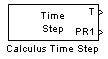
Provide the exact execution time of the time step.
Description
Each microcontroller time step can be decomposed in time into two parts. During the busy part, all the Input/Output tasks and the calculation tasks are completed. During the idle part, the microcontroller is waiting for the time of the next time step to start.
Time step is usually controlled using the timer1. Steps execution starts when timer1 reachs the precomputed PR1 value and is then reseted. The "Calculus Time Step" block extract the Timer1 value at the end of the busy part. Comparing this value to PR1 provides the margin for the step computation time. The PR1 value corresponding to the model time-step can be found in the Master block dialog box.
Note that this block works only when time step is based on the timer 1 (in master block configuration, ie, does not work when using ADC sample time as reference for time).
Dialog Box
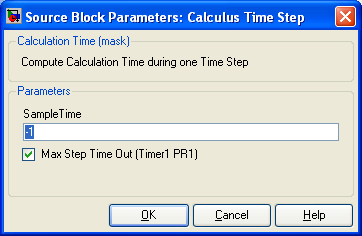
Sample Time
-1 is inherited
-
Max Step Time Out (Timer1 PR1)
-
When this case is checked, a second output provide the PR1 value. You can read directly this value in the master block configuration dialog.
Dividing first input by PR1 gives the percentage of charge of the microcontroller (using non integer division !).
Typically, 'the calculus time step' block output is connected directly to the 'Tx Output Multiplexed For Matlab Lavview' block. Values can then be plotted with the matlab graphical user interface. With multirate simulink models, force the sample time to the model time step (ie, the minimum time step possible for a block of the model). Thus, you will obtain the execution time for the different rate of the model and you will be able to measure the time margin for each one.
-
|
The Microchip name PIC, dsPIC, and MPLAB are
registered trademarks of Microchip Technology Inc.
MATLAB, Simulink, and Real-Time Workshop are
registered trademarks of The MathWorks, Inc.
| Lubin Kerhuel 's Website |
Contact : [adresse e-mail retirée] |
|
|


